

An appointment request is a simple action, until analytics turns it into a privacy problem. In healthcare, a single URL, referrer, or event parameter can expose HIPAA safe appointment tracking gaps you never meant to create.
This guide explains how to track appointment funnels with server-side Google Tag Manager (sGTM) while following HIPAA’s minimum necessary standard. You’ll see concrete safe vs unsafe examples, a practical sGTM configuration walkthrough, and a testing plan you can hand to an analytics engineer.
Where appointment tracking leaks PHI (and how to stop it)
HIPAA risk often sneaks in through “normal” marketing habits, like sending a conversion when a user lands on a thank-you page. The issue is not the conversion itself. The issue is what rides along with it: URLs, referrers, and payload fields that can become PHI when tied to health context.
HHS has made it clear that online tracking can create HIPAA exposure depending on context and data shared, and it has also seen court-driven changes to parts of that guidance. Start with the primary source, then review updates with counsel: HHS guidance on online tracking technologies. For a plain-English summary of the 2024 update and its implications, see WSGR’s analysis of OCR tracking guidance.
Minimum necessary, translated for event design
“Minimum necessary” becomes a design rule: collect only what you need to answer marketing questions. In appointment tracking, you almost never need identity. You need counts, sources, and funnel step timing.
Here are common unsafe patterns that show up in real implementations:
- PHI in URLs:
/thank-you?provider=smithor/booked?email=jane@domain.com(query strings get sent in requests, logs, and sometimes referrers). - PHI in event names/params:
appointment_booked_dr_smithorpatient_emailas an event parameter. - PHI in referrers: a scheduling page URL that includes appointment type or clinician name, then becomes the
Refererheader on the next request. - Sensitive care location clues: “clinic location” can become identifying for sensitive services (for example, a small specialty clinic).
Safe tracking keeps the “shape” of the funnel without carrying identity:
- Use generic event names like
appointment_start,appointment_submit,appointment_confirm. - Use coarse, non-identifying parameters like
traffic_source,service_line_category(broad),form_variant,device_type. - Generate a server-side appointment_id that is non-reversible and not derived from email, phone, or DOB.
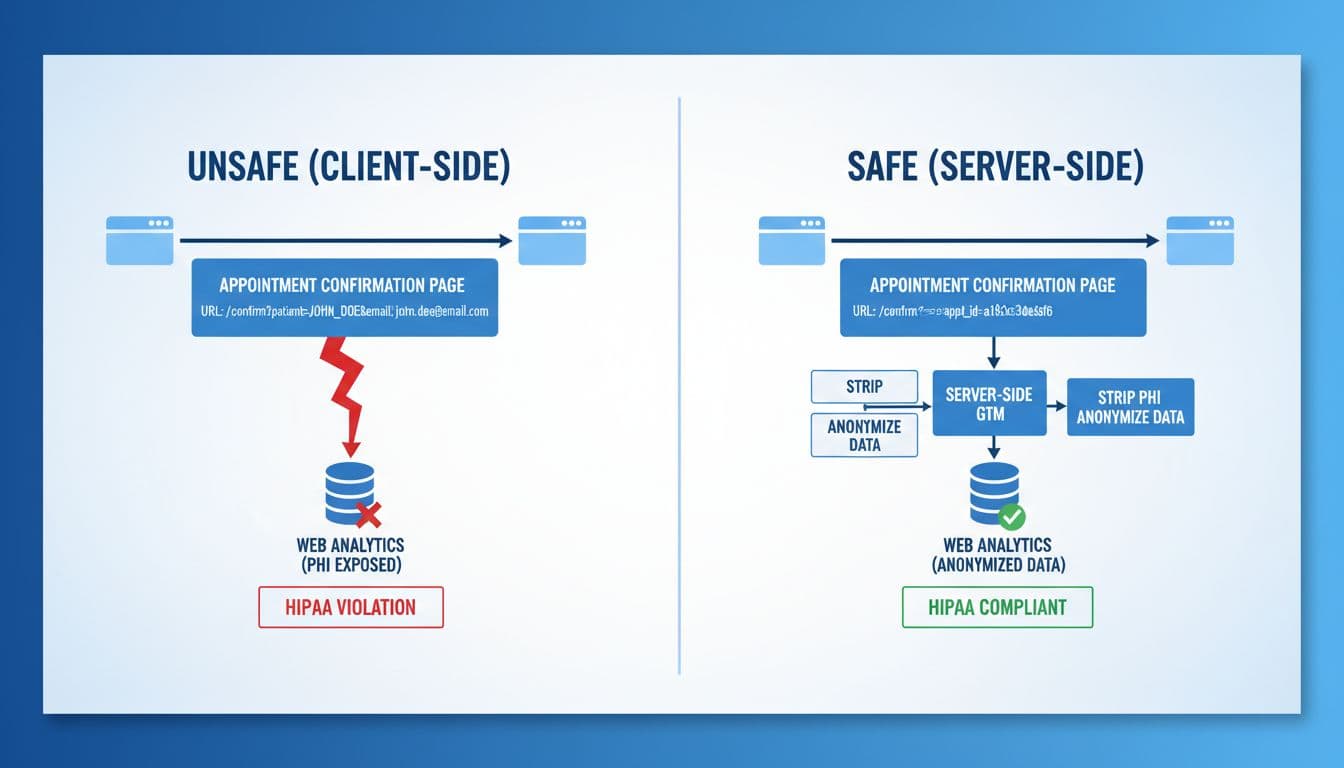
A good gut-check: if a value would look strange printed on a clinic’s waiting room receipt, it doesn’t belong in analytics.
sGTM configuration walkthrough for HIPAA-safe appointment tracking
Server-side GTM helps because it gives you a controlled checkpoint. Instead of every browser sending details to multiple vendors, your server container receives requests, strips risk, then forwards only what you approve.
Google’s reference for event delivery paths is helpful when planning sources (web, backend, or measurement protocol): send data to server-side Tag Manager.
Step 1: Create a first-party tagging domain
Set up a dedicated subdomain such as tags.yourdomain.com, then point it (via DNS) to your sGTM service endpoint. Use HTTPS, restrict admin access, and treat logs as sensitive. Even if logs are “just technical,” they can still capture URLs or headers you don’t want retained.
Step 2: Use the GA4 Client, but don’t trust it blindly
In the server container, configure the GA4 Client to accept only the request types you expect. Then decide where events will originate:
- For website funnel steps, send a minimal event from the browser to sGTM.
- For the true “appointment booked” moment, prefer a backend-to-sGTM event from your scheduling system or middleware, because it’s easier to control and sanitize.
Step 3: Put an allowlist/denylist in front of every forward
Think of this as airport security for parameters.
- Allowlist only the parameters you need for reporting.
- Denylist anything that could become PHI:
email,phone,dob,first_name,last_name,provider,insurance, free-text fields, and any IDs sourced from your EHR.
A practical pattern is to transform incoming requests into a clean internal schema, then only map that schema to GA4. If a new parameter appears, it should drop by default until approved.
Step 4: Strip query strings and referrer details
Two high-risk places where PHI hides are the page URL and the referrer.
- Normalize page_location: store only the path (for example
/thank-you) and drop the query string entirely. - Minimize referrer: keep only the origin (for example
https://www.google.com) or remove it for sensitive flows.
Also review your site’s URL strategy. If marketing wants to test providers or services, keep those details in internal systems, not in public URLs.
Step 5: IP handling and log hygiene
GA4 processes IP for geolocation and then discards it, but you still need to manage what you store. Configure your sGTM hosting and logging so you don’t retain full IPs longer than needed, and redact request bodies from logs by default. If you must debug payloads, use short-lived, access-controlled debugging with redaction.

Consent, vendor contracts, testing, and ongoing audits
Server-side tagging doesn’t replace consent. It enforces it.
CMP + Consent Mode v2, with healthcare defaults
If you use Google tags, Consent Mode v2 defines how tags behave based on user choices. Review Google’s definitions and parameters here: Consent mode reference.
In healthcare, many teams choose opt-in for analytics on pages tied to appointment intent, symptoms, or sensitive service lines. Opt-out can be tempting because numbers look better, but it increases compliance risk and erodes trust. When you do use Consent Mode, decide whether “advanced mode” pings fit your privacy posture, then document the decision.
Server-side enforcement pattern: pass consent state to sGTM (from your CMP), then block GA4 forwarding unless analytics_storage is granted. Keep the raw consent cookie out of downstream vendors.
BAAs, vendor terms, and when not to send to ad platforms
Treat vendor paperwork as part of the build. Your scheduling vendor, call tracking provider, and any data processor that touches appointment details may need a BAA. Many mainstream ad platforms and analytics tools do not offer BAAs for standard web tracking, so confirm in writing before sending anything that could be PHI.
A simple rule protects teams under pressure: if a payload field would make compliance uncomfortable in an email, don’t send it to an ad platform. That includes enhanced conversions built from email or phone, even when hashed, if the context could be health-related.
A testing plan that catches PHI before it ships
Run tests like you’re trying to break your own setup:
- Use Tag Assistant and sGTM preview to confirm only approved tags fire.
- Inspect browser network requests for query strings, referrers, and unexpected params.
- Validate server logs don’t store request bodies or full URLs by default.
- Audit GA4 event payloads, and consider periodic exports for pattern scanning (for example, detecting emails or phone formats). This checklist is a useful starting point: GA4 healthcare setup checklist.
Clean measurement also supports growth. Many Connecticut practices searching “local seo agency near me” want proof that SEO leads turn into scheduled visits. If you’re comparing an SEO agency Hartford teams recommend, evaluating Hartford SEO services, or interviewing an SEO company Hartford CT owners trust, ask how they track appointments without collecting PHI. For broader visibility work that still respects privacy, see Sphere Marketers’ professional SEO services.
Disclaimer: This article provides general information and is not legal advice. Consult qualified counsel and compliance professionals for your specific situation.
Conclusion
HIPAA-safe appointment tracking is less about one tool and more about disciplined data boundaries. sGTM gives you a place to enforce those boundaries, with allowlists, URL cleanup, referrer controls, and consent-based forwarding. When you pair that with careful vendor contracts and regular audits, you can measure real growth while keeping PHI out of analytics.
